Install HoneyTrap on pfSense
Requirements
- A FreeBSD machine for building the package. Check pfSense docs to find out which version of FreeBSD you need.
- git must be installed on the FreeBSD machine
- The ports collection must be present on the FreeBSD machine. If it isn’t check Ports collection on the FreeBSD guide
Build and install package
All of the following steps except the fourth must be done on the FreeBSD machine.
Step 1. Clone the repository and copy the directory to the ports collection.
git clone https://github.com/honeytrap/honeytrap-pfsense-plugin.git
cp -R honeytrap-pfsense-plugin/pfSense-pkg-HoneyTrap /usr/ports/security
Step 2. Compile the packages
Setting NO_DEPENDS tells make not to install dependencies while building. Otherwise HoneyTrap would be installed on the FreeBSD machine as well.
make -C /usr/ports/security/honeytrap NO_DEPENDS=yes package
make -C /usr/ports/security/pfSense-pkg-HoneyTrap NO_DEPENDS=yes package
Step 3. Copy the compiled packages to a pfSense machine
scp /usr/ports/security/honeytrap/work/pkg/honeytrap-*.txz root@example:~
scp /usr/ports/security/pfSense-pkg-HoneyTrap/work/pkg/pfSense-pkg-HoneyTrap-*.txz root@example:~
Step 4. On the pfSense machine install the packages.
HoneyTrap will be installed along with the pfSense package if both are in the same location.
pkg add pfSense-pkg-HoneyTrap-*.txzConfiguration
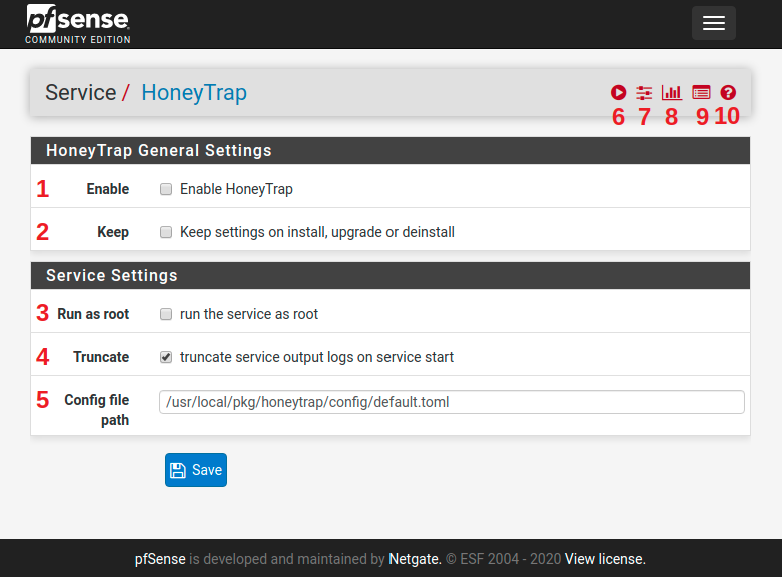
- Enable the HoneyTrap service. When checked the service is started automatically.
- Keep HoneyTrap configuration and related files when the package is installed, updated or deinstalled. When unchecked only the log files are kept.
- Check this when you want to run the service as root. You should only do this when necessary, for example when you want to use ports in the range 1-1024.
- When enabled all lines are removed from the service log file before is starts.
- The path to the HoneyTrap config file. The file must be present on the system.
- Button to start HoneyTrap manually. If HoneyTrap is already running the button is replaced with a button to restart and one to stop it.
- Configuration page for the plugin.
- An overview of service statuses.
- Page to view the output of the HoneyTrap service
- Link to pfSense documentation.